
Real SaaS screenshots.
On your Figma canvas.
In 10 seconds.
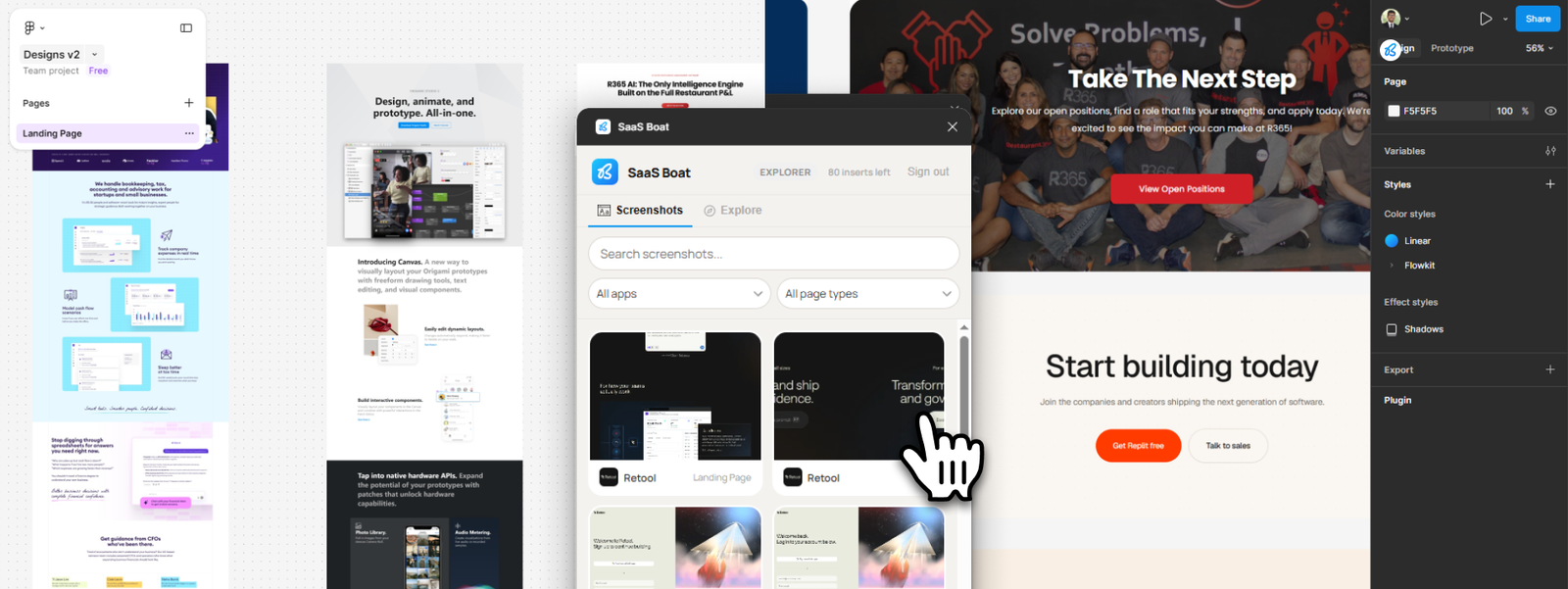
Search 4,000+ screenshots from 260+ real SaaS products. Click one. It lands on your canvas at the right size, ready to reference. No new tabs, no copy-pasting, no hunting for design references.


Proven results with innovative AI features
Thousands of teams trust Tether to deliver measurable ROI, unlock greater productivity, and harness the power of AI.
Before SaaS Boat
11 browser tabs open, half of them competitors you’re trying to screenshot. Paste into Figma. Wrong dimensions. Resize. Lose your place. Start over.

After SaaS Boat Plugin
Search “onboarding flow” inside Figma. Pick one. It’s on your canvas in one click — full resolution, correct dimensions, ready to reference.
Search & Filter
Find exactly what you’re looking for. Filter by app, page type, or industry — or search across all of it at once.

One-Click Insert
Click a screenshot and it appears on your canvas, already sized to the correct dimensions. No resizing, no paste artifacts.

4000+ Real SaaS Products
Every screenshot is from a live, shipped SaaS product. Not mockups. Not student projects. What you see is what your users see when they open a competitor.
Designers use it mid-session, not just for inspiration.
“I was designing a pricing page and pulled up 6 competitors in under a minute. That used to take me the whole morning.”
Priya M.Product Designer
“The insert is the thing. Not having to crop and resize every reference screenshot is stupid-simple but it actually changed how I work.”
James T.UX Designer
“I showed my PM what our competitors' onboarding looks like directly in Figma. She was genuinely surprised that existed.”
Lena K.Lead Designer
Deep SaaS Research, All in One Place
From heuristic evaluations to micro-interaction breakdowns — SaasBoat is where serious product people do their research before they build.

Product Manager
Hey, can someone find pricing pages from B2B SaaS products in our space?

You
Just pulled 6 relevant examples from SaaS Boat. Each one includes the full flow and notes on the key UX decisions.
Product Manager
Nice. That saves a ton of time digging. 🎉
Over 180 designers, dev and PMs trust SaaS Boat in their research.
270
SaaS products documented with screenshots, flows & audits
92
%
Of users say SaasBoat improved their design or product decisions
Start free. Upgrade when the canvas tells you to.

Explorer
Install from Figma Community and browse 12 screenshots — no account needed to start.
Free
/month
Plan Includes:
Install from Figma Community, no credit card needed
Browse & add 100 screenshots from the library/month
See what exists before you commit
Browse & add 100 screenshots from the library/month
See what exists before you commit
Officer (Monthly)
Unlimited access to the full library. Search, filter, and insert — without leaving your canvas.
$39
/month
Plan Includes:
Unlimited access to 4,000+ screenshots
One-click insert at full resolution, sized for your canvas
Filter by app, page type, and industry
Cancel anytime
One-click insert at full resolution, sized for your canvas
Filter by app, page type, and industry
Cancel anytime
Captain (Yearly)
Everything in Officer, billed annually. Save $169 compared to monthly.
Get 2 Months Extra (save upto $78)
$390
/year
Plan Includes:
Everything in Officer, unlimited
Billed annually — save $169/yr vs monthly
Priority support
Billed annually — save $169/yr vs monthly
Priority support
Quick answers.
Does this work on a free Figma plan?
Yes. The plugin works on all Figma plans — free and paid. You install it from the Figma Community and it runs inside any file.
How do I get my API key?
Create a free account at saasboat.com. Your API key is in your account dashboard — copy it, paste it into the plugin, and you’re connected. Takes about 60 seconds.
Is this officially affiliated with Figma?
No. SaaS Boat is an independent plugin built on the Figma Plugin API. It’s published in the Figma Community but isn’t made by or endorsed by Figma.
What image quality do I get?
You get full-resolution images served via our proxy — the same quality as the original screenshot, inserted directly onto your canvas. The images get resized to 800px width to avoid cluttering the canvas when you import multiple screenshots, but can be resized to match your needs.
Can I use these screenshots in client presentations?
Yes! Screenshots are provided for design reference and research, to inform your own design decisions, not for redistribution. Using them in a client-facing competitive analysis deck is fine. Publishing them as your own work is not.
Never stop your research and design process
Get started for free
Install Now
to your figma

4.8/5
Rating on
Peerlist